Four Methods to Extend Your Suno Tracks to 3–5 Minutes
![Vertical layout showing 4 numbered methods with icons: Repeat icon for Continue feature, Document icon for Longer lyrics, Flag icon for [Outro] tag, Speedometer icon for BPM control. Each shows a brief explanation and benefit. Bottom includes a pro tip about fixing style drift during extensions.](/_next/image?url=%2Fblog%2F04-how-to-make-full-length-songs-on-suno.jpeg&w=3840&q=75)
One of the most common frustrations: "Why are my Suno songs only 1–2 minutes long?" It's by far the biggest complaint from new users. The good news: there are four methods that actually work to generate full-length tracks (3–5 minutes). They're not complicated, but each one works in a different way.
Method 1: Use the Continue Feature
After Suno generates your first clip, click "Continue from this song." It extends the track while keeping the same style and melody. You can repeat this 2–3 times until you have a full-length song.
How it works: Suno generates a continuation that stays musically coherent with what came before. The vocals maintain the same character, the instruments stay consistent, and it feels like one unified song instead of separate pieces.
- Fastest way to extend a song
- Maintains musical continuity
- Each continuation costs credits
Method 2: Write Longer Lyrics
Suno's output length is partly determined by how much content you give it. If you write 3 verses, 3 choruses, a bridge, and an outro, it has to generate more audio to fit all of it.
More lyrics = more audio. It's that simple. A song with 8 sections will naturally be longer than a song with 4 sections.
- Plan your song structure upfront
- Write complete lyrics before generating
- Suno still respects your lyric count and structure tags
Method 3: Use the [Outro] Tag
Without an [Outro] tag, Suno doesn't know when to end. It either cuts off abruptly or fades randomly. Adding [Outro] with a few closing lyrics gives it a clear ending point and often extends the track naturally.
[Outro]
Your outro lyrics here
The outro signals to Suno: "This is the end section, make it satisfying." It usually adds 15–30 seconds of content and makes the song feel complete instead of cut short.
Method 4: Slow Down the BPM
A song at 70 BPM will naturally be longer than one at 140 BPM for the same number of bars and lyrics. The slower the tempo, the more time is needed to fit the same amount of musical content.
If you need length, go slower. A 70 BPM indie song with the same lyrics as a 140 BPM EDM track will be nearly twice as long.
- Affects the feel of the song
- Slower = longer without changing lyrics
- Match BPM to your genre
Combining Methods for Maximum Length
The most reliable approach: Write longer lyrics + use [Outro] + generate at a moderate BPM, then use Continue 1–2 times if needed.
This way, your initial generation is already substantial (3–4 minutes), and you only need one or two continuations to round it out to 5+ minutes. You waste fewer credits and get more control over the final result.
Bonus: Fix Style Drift on Extensions
Pro tip: If you're extending a song and it starts to drift from the original style, try regenerating that extension with a slightly more specific style prompt. Sometimes the AI needs a reminder of what genre or vibe you want. Include a key descriptor from your original prompt to keep the continuity tight.
The Bottom Line
You have four reliable levers for controlling song length: Continue feature, lyric volume, [Outro] tag, and BPM. Master these, and you'll never generate a disappointing 1-minute clip again. Combine them strategically, and you can hit exactly the length you're aiming for.
Create your first Suno album on SongSmith
From a single idea to a complete, YouTube-ready album. AI lyrics, Suno automation, album art, and video rendering — all in one workflow.
Get started freeKeep reading
![Three-column cheat sheet showing all Suno structure tags: Structure column with [Intro], [Verse], [Chorus], [Bridge], [Outro], [Break], [Interlude]. Vocal Delivery column with [Whispered], [Spoken Word], [Belted], [Falsetto], [Harmonized], [Ad-lib]. Instrumental column with [Instrumental], [Guitar Solo], [Piano Solo], [Drop]. Bottom shows a perfect song template flowchart.](/_next/image?url=%2Fblog%2F03-suno-structure-tags-cheat-sheet.jpeg&w=3840&q=75)
Master Every Suno Structure Tag for Professional Song Organization
Complete reference of Suno structure tags: [Verse], [Chorus], [Bridge], [Intro], [Outro], vocal delivery tags, and instrumental tags. Save this cheat sheet for every session.
3 min read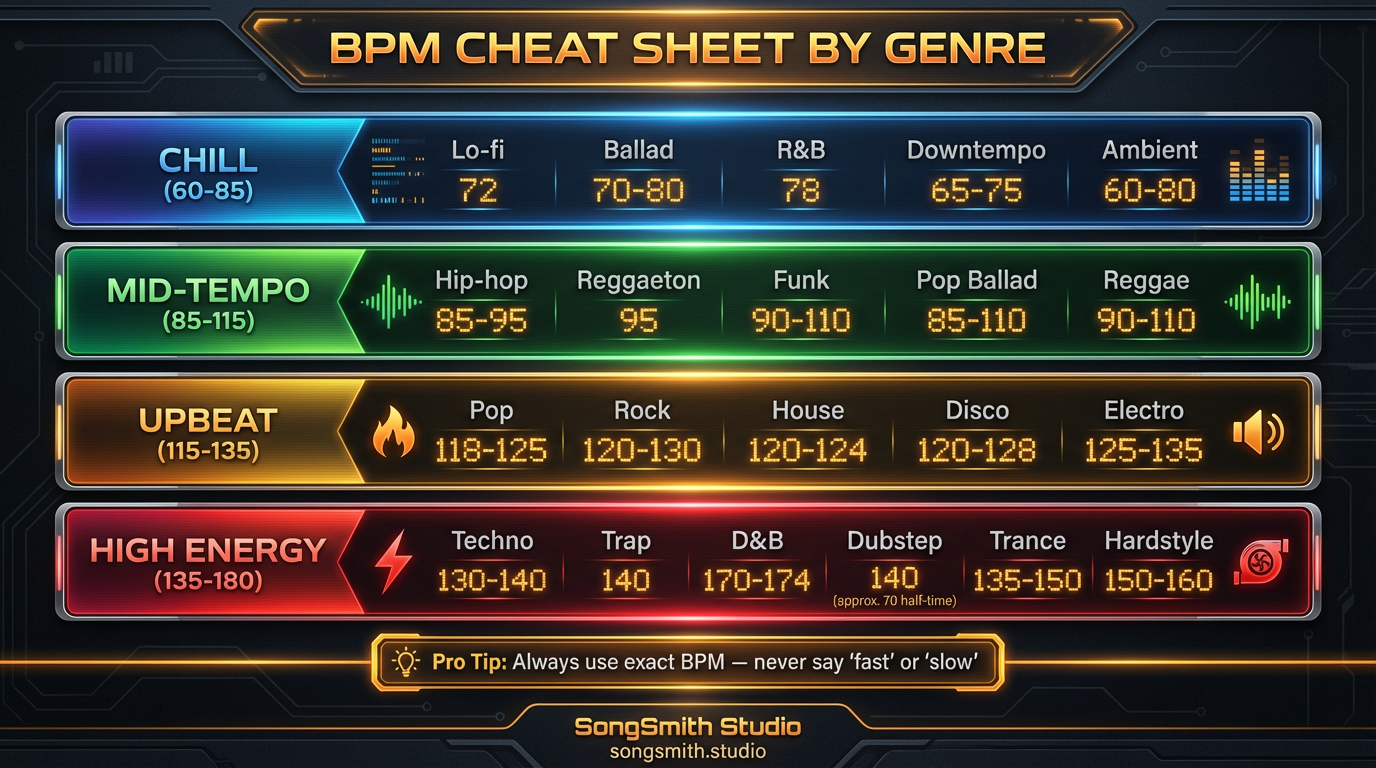
BPM Cheat Sheet by Genre: Stop Saying Fast or Slow
Never guess BPM again. Reference exact tempo ranges for every genre from lo-fi to hardcore punk. Control your Suno song's energy with precise beats per minute.
3 min read