Instrument Tags That Actually Work on Suno
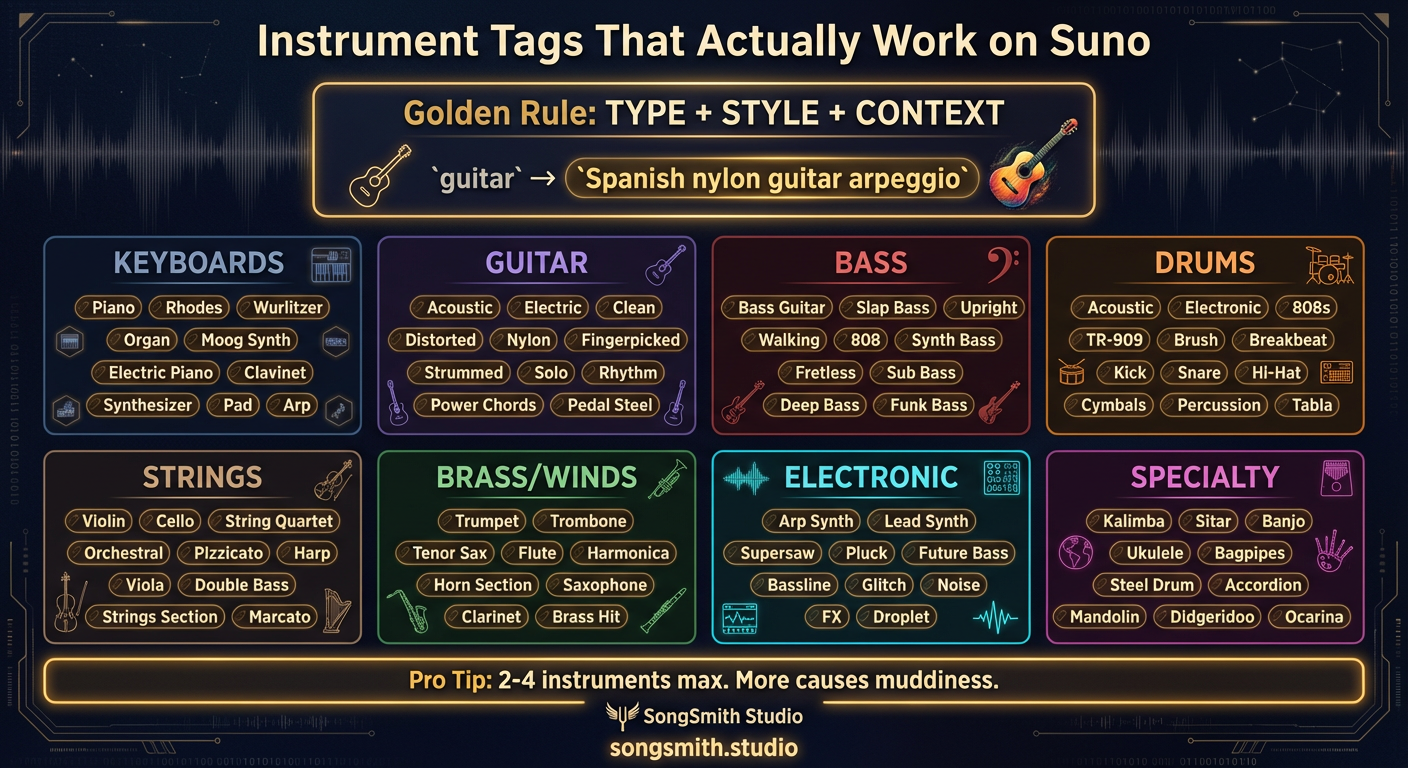
Writing "guitar" or "piano" in your style prompt is too vague. Suno needs specificity. "Spanish nylon guitar arpeggio" beats "guitar" every time because it tells the AI exactly what sound to create. The secret is that Suno responds to detailed instrument descriptors far more reliably than generic ones. Here's every instrument tag that consistently produces good results.
The Golden Rule: TYPE + STYLE + CONTEXT
Instead of just "guitar," combine three elements: the instrument type, its style, and how it's played. This single principle will improve your results immediately.
Keyboard Instruments
Piano, Electric Piano, Rhodes, Wurlitzer, Organ, Hammond Organ, Synth Pad, Analog Synth, Moog Synth, Harpsichord, ClavinetGuitar Variations
Acoustic Guitar, Electric Guitar, Clean Electric Guitar, Distorted Guitar, Spanish Nylon Guitar, Rhythm Guitar, Lead Guitar, Fingerpicked Guitar, Slide Guitar, Pedal SteelBass Instruments
Bass Guitar, Slap Bass, Upright Bass, Walking Bass, Synth Bass, 808 Bass, Fretless Bass, Acid BassDrums & Percussion
Acoustic Drums, Electronic Drums, 808s, Drum Machine, TR-909, Breakbeat, Brush Drums, Brushed Snare, Taiko, Congas, Bongos, Tambourine, Handclaps, ShakerString Instruments
Violin, Cello, String Quartet, Orchestral Strings, Pizzicato Strings, HarpBrass & Woodwinds
Trumpet, Muted Trumpet, Trombone, French Horn, Brass Section, Tenor Sax, Alto Sax, Soprano Sax, Flute, Clarinet, HarmonicaElectronic & Synth
Arpeggiated Synth, Lead Synth, Synth Stabs, Pluck Synth, Supersaw, Wobbly BassSpecialty Instruments
These work best with strong genre context:
Kalimba, Sitar, Banjo, Mandolin, Ukulele, Accordion, Steel Pan, Fiddle, BagpipesPer-Section Instrument Assignment
A powerful technique: put instrument changes directly in your lyrics by section:
- [Verse] - minimal: guitar arpeggios + soft bass
- [Chorus] - full: brass stabs + synth pad + full drums
- [Bridge] - featured: solo piano or solo saxophone
- [Outro] - fade: guitar fade with strings
Descriptive Instrument Tags as Section Headers
You can also use descriptive instrument tags directly as section labels:
[Haunting Piano Interlude]
[Funky Saxophone Break]
[Soaring Electric Guitar Solo]
[Orchestral Buildup]
[Tribal Drum Break]
Use only one instrument tag per section for best results. Too many competing instruments create muddiness.
Pro Tips
- Limit to 2–4 instruments max in your style prompt. More causes muddiness and conflicting signals.
- Put your lead instrument first in the prompt. Suno prioritizes by position.
- Add "solo" to any instrument to make it the focus: "piano solo" vs just "piano."
- Pair contrasting instruments for depth: bright lead + warm pad, or acoustic + electronic.
- For cleaner mixes, specify what's not there: "no drums" for acoustic intimacy.
Conclusion
Instrument specificity is one of the highest-impact tweaks you can make to your Suno prompts. Instead of generic names, use the full descriptors from this reference. Combine instrument type, style, and context, and your songs will sound infinitely more intentional and professional. Save this reference. It's the difference between generic and purposeful.
Create your first Suno album on SongSmith
From a single idea to a complete, YouTube-ready album. AI lyrics, Suno automation, album art, and video rendering — all in one workflow.
Get started freeKeep reading
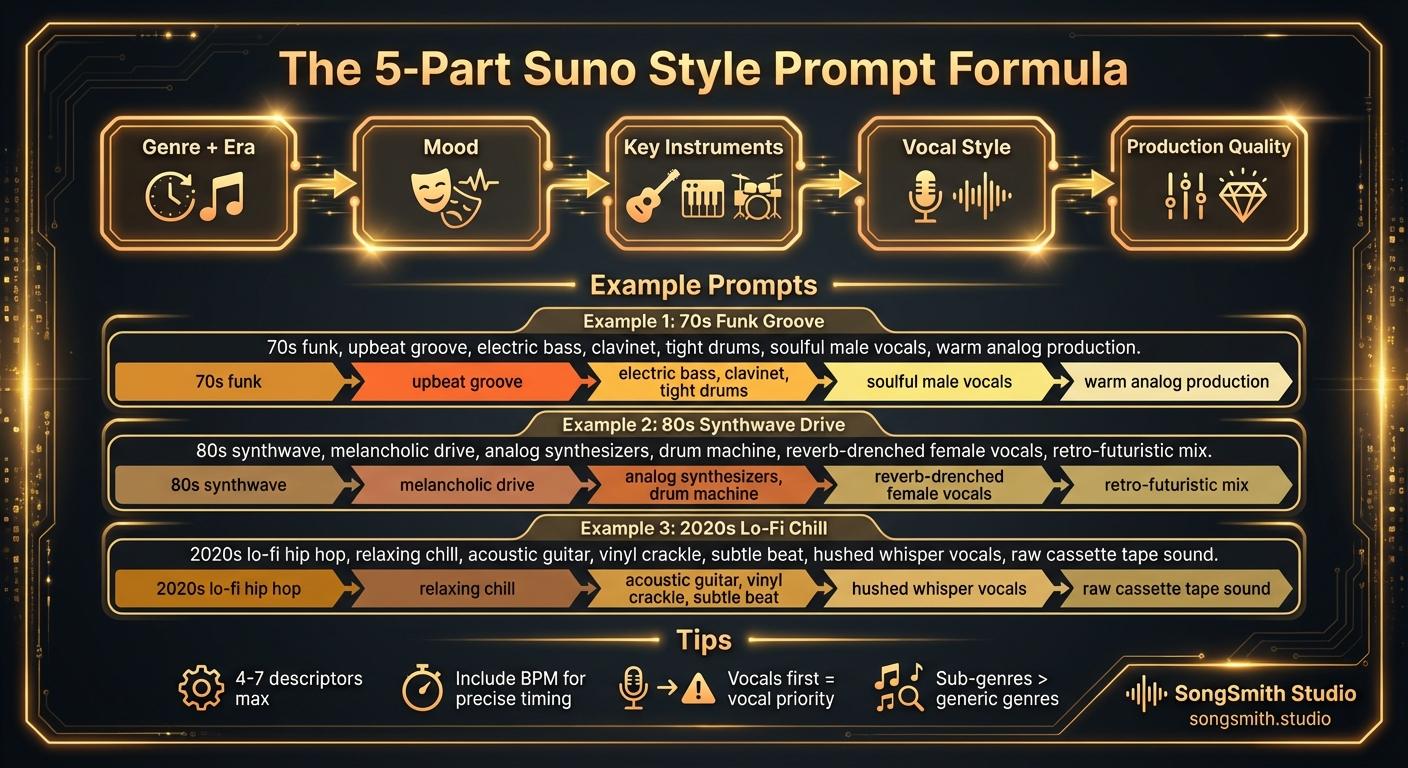
Craft Precise Style Prompts Using This Battle-Tested Formula
Master the 5-part formula for Suno style prompts: Genre + Era, Mood, Instruments, Vocal Style, Production. Learn tips for better results and example prompts that work.
2 min read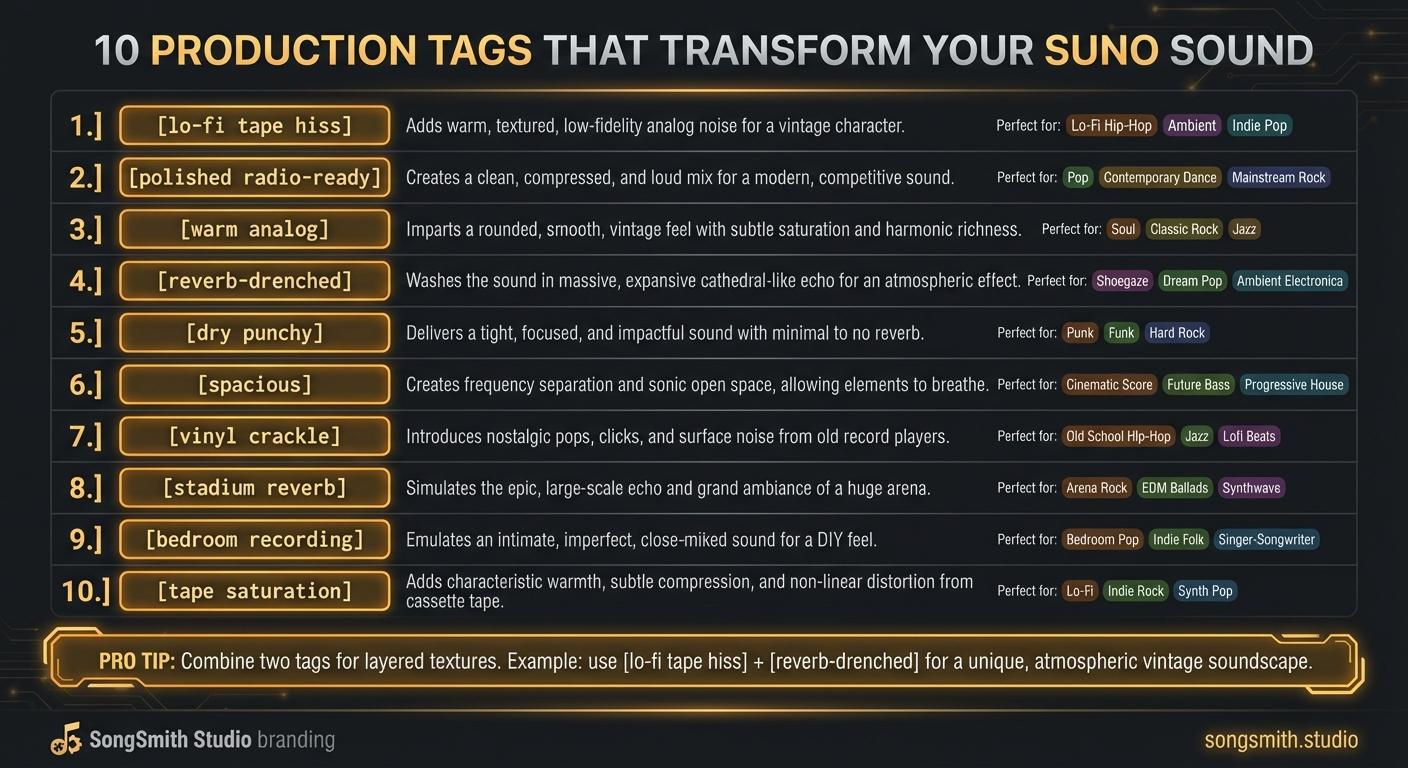
10 Production Tags That Transform Your Suno Sound
Master production tags to control texture, space, and vibe in Suno. Learn lo-fi, polished, analog, reverb, and more, transform your track's sonic character.
4 min read