How to End a Suno Song Without It Cutting Off
![Dark-themed cheat sheet with three ending tag cards: [Outro] for closing section with amber accent, [End] for hard stop with red accent, [Fade Out] for gradual volume reduction with blue accent. Middle shows The Bulletproof Formula flowchart: [Chorus] → [Outro] → [End]. Bottom displays four genre-specific ending examples with styling boxes for fade, dramatic, stripped, and EDM endings.](/_next/image?url=%2Fblog%2F26-suno-song-endings-cheat-sheet.jpeg&w=3840&q=75)
Nothing ruins a great Suno song faster than an abrupt cutoff or an endless loop. If your songs keep ending awkwardly, you're probably missing or using the wrong ending tags. After tracking thousands of songs, the most common ending problem is that 90% of abrupt cutoffs come down to missing or incorrectly placed ending tags. Here's exactly how to fix it.
The 3 Ending Tags and What They Do
- [Outro]: Defines a closing section. Gives the AI room to wind down musically. This is your most reliable option.
- [End]: Hard stop signal. Tells Suno "stop generating here." Works best when placed after an [Outro].
- [Fade Out]: Gradual volume reduction. Inconsistent on its own but works well combined with other tags.
The Bulletproof Ending Formula
This combination works because [Outro] gives the AI a musical resolution section, and [End] confirms where to stop:
[Chorus]
your final chorus lyrics

[Outro]
1-2 lines of lyrics, or an instrumental description

[End]
Use this template for almost any genre. The AI understands that you're closing the song and won't create an awkward fade or abrupt cutoff.
Heads-up: in Suno, parentheses get sung. Don't wrap placeholder text in parens. Write the lyric or descriptor in plain text inside the section. Reserve (...) for actual ad-libs or sung asides.
Advanced Ending Techniques by Genre
Bracket discipline: anything that isn't sung lyrics goes inside [...]. Bare text between tags (like [Outro] soft keys [End]) would be sung by Suno, not interpreted as an instruction. Use the colon syntax ([Outro: descriptors]) or stack separate tags.
Fade Ending
[Outro: soft keys, gentle fade, distant reverb] [End]Dramatic Ending
[Outro: final guitar sustain, cymbal swell] [End]Stripped-Back Ending
[Outro: drums drop out, bass and keys only, gentle resolution] [End]Loop-Based Genres (EDM, Ambient, Lo-Fi)
[Outro] [Instrumental Fade Out] [End]Why Endings Go Wrong
- No ending tags at all: Suno doesn't know when to stop and either loops or cuts randomly.
- Only using [End]: Hard stop without musical resolution sounds jarring and unfinished.
- Outro is too long: Keep it to 15–25 seconds. More than that and the AI drifts or loses focus.
- Starting the outro during a busy section: Begin the outro on a stable loop, not during a fill or vocal run.
Pro Tips
- Always pair [Outro] + [End] together. This is the most reliable combination.
- Add 1–2 descriptors to [Outro] for the sound you want: "soft piano, fading reverb."
- Generate 2 versions and pick the one with the cleaner ending.
- If the ending still loops, try: "no restart, no new chorus, resolve" in your outro description.
- For ballads, use "soft landing, vocal hum, gentle resolution."
- For rock, use "final chord ring out, cymbal crash, sustain."
- Last resort: use Suno's built-in Crop and Fade Out tool to manually trim.
Conclusion
The bulletproof formula: [Outro] with a descriptive ending, followed by [End], solves 90% of ending problems. Your song structure matters, and the ending is where you leave your listener with a final impression. Master these tags and your songs will end the way you intend, every time.
Create your first Suno album on SongSmith
From a single idea to a complete, YouTube-ready album. AI lyrics, Suno automation, album art, and video rendering — all in one workflow.
Get started freeKeep reading
![Three-column cheat sheet showing all Suno structure tags: Structure column with [Intro], [Verse], [Chorus], [Bridge], [Outro], [Break], [Interlude]. Vocal Delivery column with [Whispered], [Spoken Word], [Belted], [Falsetto], [Harmonized], [Ad-lib]. Instrumental column with [Instrumental], [Guitar Solo], [Piano Solo], [Drop]. Bottom shows a perfect song template flowchart.](/_next/image?url=%2Fblog%2F03-suno-structure-tags-cheat-sheet.jpeg&w=3840&q=75)
Master Every Suno Structure Tag for Professional Song Organization
Complete reference of Suno structure tags: [Verse], [Chorus], [Bridge], [Intro], [Outro], vocal delivery tags, and instrumental tags. Save this cheat sheet for every session.
3 min read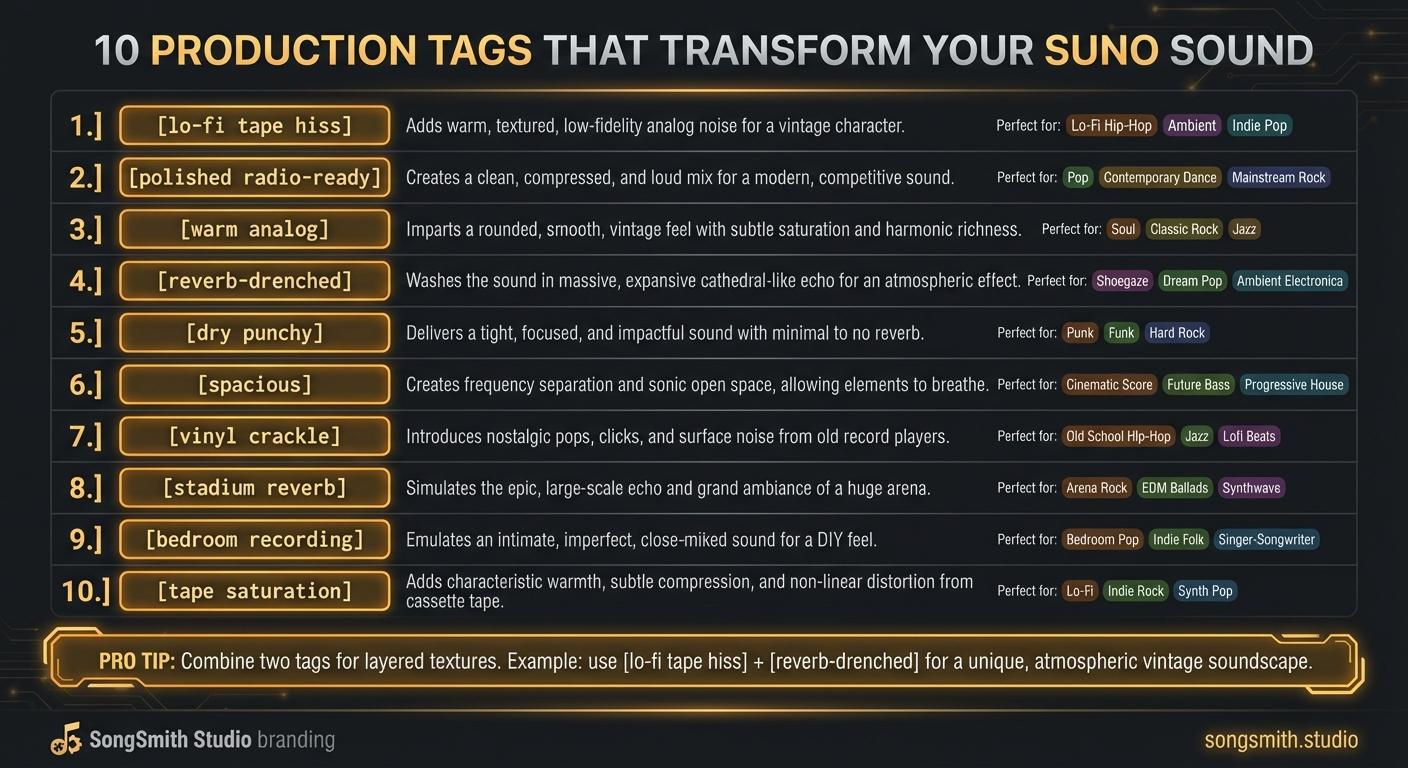
10 Production Tags That Transform Your Suno Sound
Master production tags to control texture, space, and vibe in Suno. Learn lo-fi, polished, analog, reverb, and more, transform your track's sonic character.
4 min read