Use Suno Personas to Lock In a Consistent Vocal Identity
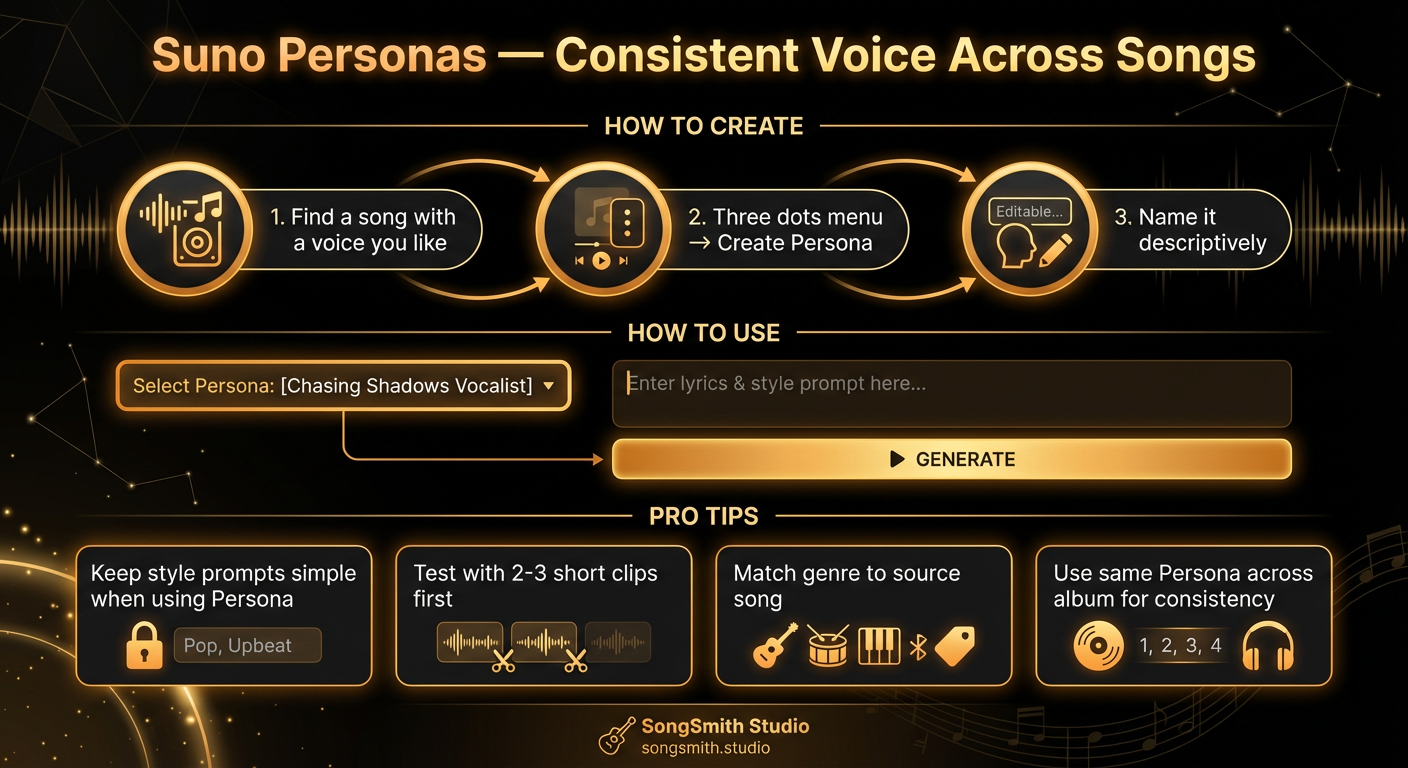
If you've been frustrated that every Suno song sounds like a completely different artist, Personas are the fix. They let you lock in a specific vocal identity and reuse it across multiple songs. If you're building an album or want a consistent sound, this is the feature that makes it possible.
What Are Personas?
A Persona is a saved vocal identity based on an existing Suno song. Once you create a Persona, Suno will use that same voice and vocal character for future generations. Instead of every song having a random voice, all your songs can have the same singer.
Think of it like hiring a session vocalist, once you pick a voice, that voice records all the songs in your project.
How to Create a Persona
- Find a Suno song with a voice you like. It can be a song you generated yourself or one from the Suno explore page. Listen carefully and make sure the vocal character matches your vision.
- Click the three-dots menu on that song.
- Select "Create Persona" from the dropdown.
- Name it something descriptive. Use clear names like "Raspy Female Rock" or "Smooth Male R&B": not vague ones like "Voice 1." You'll want to remember what this Persona sounds like when you come back to it later.
That's it. Your Persona is now saved and ready to use.
How to Use a Persona
- Go to Custom Mode (not Simple Mode).
- Select your Persona from the Persona dropdown.
- Write your lyrics and style prompt as normal.
- Generate. Suno will use that vocal identity for the new song.
Every song you generate with that Persona will have the same vocalist, the same vocal tone, and the same character. Consistency across an album becomes possible.
Pro Tips for Using Personas
- Keep your style prompts simple when using a Persona. The Persona carries the vocal identity: let it do its job. Your style prompt should focus on genre, mood, and instruments. Adding vocal descriptors on top of a Persona can sometimes create conflicting instructions.
- Run 2–3 short test generations before committing credits to a full song. Test the Persona with a quick verse-and-chorus clip first. Make sure the voice still works in your new genre or mood.
- Personas work best when the genre of your new song is similar to the source song. If your Persona comes from a lo-fi track, it'll work great for other lo-fi songs but might struggle in a heavy metal context.
- You can have multiple Personas. Keep separate ones for different projects: a folk Persona, a hip-hop Persona, a pop Persona, etc. Don't overthink it; create as many as you need.
Personas for Album Creators
This is where Personas shine. Using the same Persona across all tracks gives your album a consistent vocal identity, like a real artist singing every song. It creates coherence and professionalism. Instead of sounding like a random collection of AI songs, it feels like a deliberate project from a single artist.
For a 10-song album, create or find one Persona you love, then generate all 10 songs with that voice. The vocal continuity makes a massive difference in how the album feels as a whole.
Workflow for Persona-Based Albums
- Find or generate a Persona source song. Something that captures the vocal character you want for your entire project.
- Create the Persona and name it clearly (e.g., "Indie Pop Vocalist 2026").
- Write your album's lyrics and concepts. Each song is its own creative work.
- Generate each song using the same Persona. Vary the genre, mood, and instruments per song, but keep the voice consistent.
- Do quality checks. Listen to 2–3 songs in a row to make sure the Persona works across your different styles.
Mixing Personas
You're not locked into one Persona per album. For example, you might use a female vocal Persona for verses and choruses, and a male vocal Persona for a featured artist role, or switch between two different Personas for different songs to create variety while maintaining a professional sound.
The key is intentionality: if you switch Personas, make it a deliberate artistic choice, not an accidental inconsistency.
SongSmith Music Profiles vs. Suno Personas
If you use SongSmith, you'll notice we have a feature called Music Profiles. Don't confuse these with Suno's native Personas. They solve different problems and work best *together*.
- Suno Persona: locks the voice. Picked from a reference Suno song. Controls vocal character across generations.
- SongSmith Music Profile: guides the AI that writes your lyrics and style prompt before the song is generated. Controls tone of lyrics, instrument choices, production hints, album art direction, YouTube descriptions.
The recommended workflow: pick a SongSmith Music Profile to set the artistic direction for the AI concept generator, then pick a Suno Persona inside Suno to lock the vocal. Your Music Profile's Music Style Instructions field should still include an exact BPM and a musical key per our [style prompt formula](/blog/suno-style-prompt-formula). The Persona fixes the voice, but it can't fix a style prompt that says "fast tempo" instead of "120 BPM".
The Real Power of Personas
Personas transform Suno from a tool that generates isolated clips into a system for building cohesive projects. Instead of rolling the dice on a different voice every time, you're building an artist identity that's consistent across your entire catalog. That consistency is what separates hobby projects from professional-feeling releases.
Create your first Suno album on SongSmith
From a single idea to a complete, YouTube-ready album. AI lyrics, Suno automation, album art, and video rendering — all in one workflow.
Get started freeKeep reading
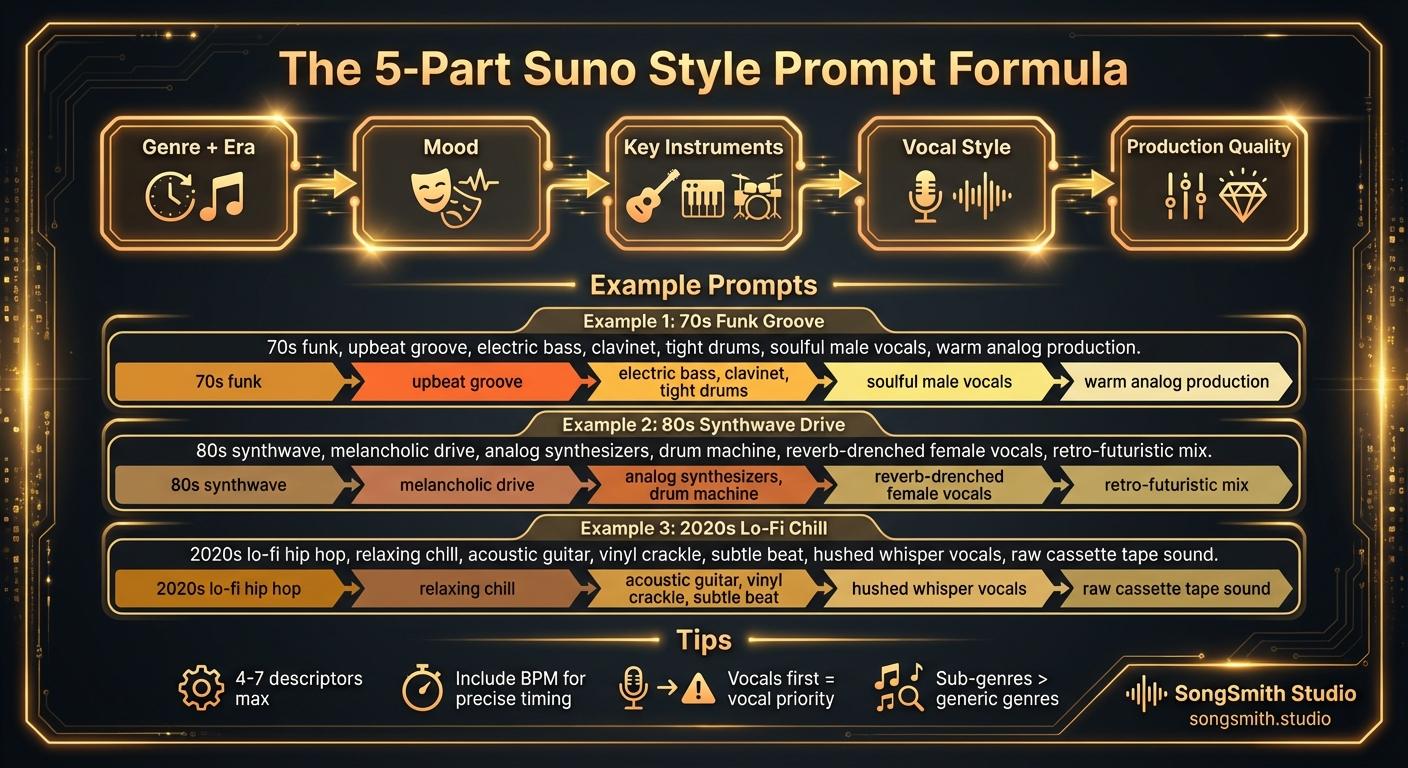
Craft Precise Style Prompts Using This Battle-Tested Formula
Master the 5-part formula for Suno style prompts: Genre + Era, Mood, Instruments, Vocal Style, Production. Learn tips for better results and example prompts that work.
2 min read![Vertical layout showing 4 numbered methods with icons: Repeat icon for Continue feature, Document icon for Longer lyrics, Flag icon for [Outro] tag, Speedometer icon for BPM control. Each shows a brief explanation and benefit. Bottom includes a pro tip about fixing style drift during extensions.](/_next/image?url=%2Fblog%2F04-how-to-make-full-length-songs-on-suno.jpeg&w=3840&q=75)
Four Methods to Extend Your Suno Tracks to 3–5 Minutes
Stop getting 1-minute clips. Learn 4 proven methods to make full-length Suno songs: Continue feature, longer lyrics, [Outro] tags, and BPM control. Plus a bonus tip for style drift.
3 min read