Stop Regenerating Whole Songs: Fix One Section with Suno's Edit Tools
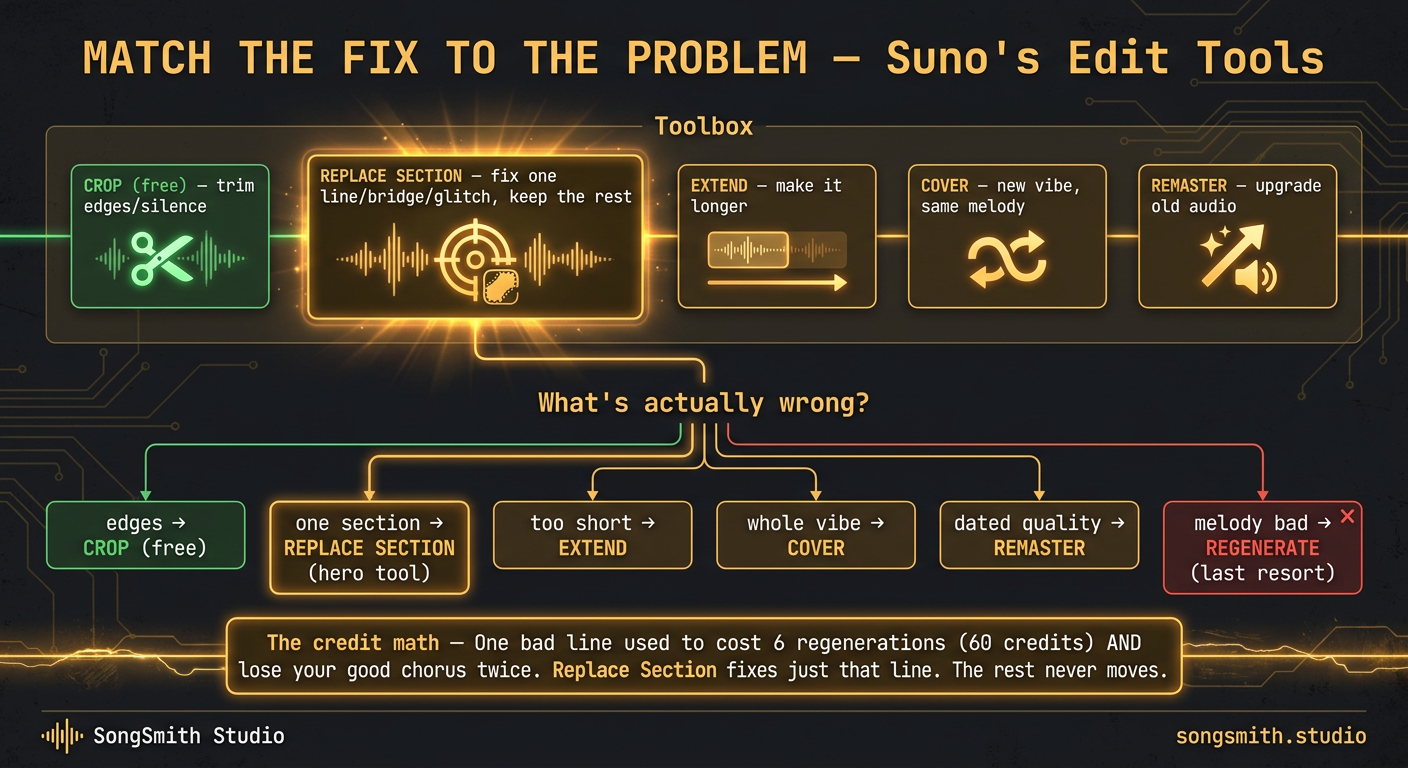
The mental model that saves the most credits: match the size of the fix to the size of the problem. Wrong whole vibe → Cover. Song too short → Extend. But one bad section inside an otherwise-perfect take? That's a job for the edit tools, and they're the cheapest fix in the app.
Here's the full toolbox, smallest fix to biggest:
1. Crop / Trim: fix the edges
The simplest tool, and free. Your song has a messy 3-second intro, a tail that rings out too long, or a dead bit at the front. Crop it. No regeneration, no credits. You're just trimming the audio you already have.
Use it for: awkward count-ins, long silent tails, trimming to a clean loop, cutting a track down for short-form.
2. Replace Section: fix the middle (this is the big one)
This is Suno's most underused power tool. You select a region of the song on the timeline and regenerate only that part (new lyrics, new melody, or new style) while everything around it stays locked. It's the "inpainting" idea borrowed from image AI: repaint one patch, keep the rest of the canvas.
Use it for:
- One mumbled or mispronounced line → select that line, fix the lyric, regenerate just it
- A weak bridge in an otherwise great song → select the bridge, push the style, leave the verses/choruses untouched
- A four-second audio glitch or artifact → select the glitch, regenerate the patch
- A chorus that's almost there → tweak its tags and re-roll only the chorus
Why this matters: a full regeneration rolls the dice on the entire song. You fix the bridge and now the chorus you loved is gone. Replace Section keeps your keepers. You stop trading a known problem for three unknown ones.
3. Remove Section: cut what shouldn't be there
The same edit menu can also take a section out. A second verse that drags, a dead instrumental break, a chorus repeat the song doesn't need: select it and remove it, and the rest of the take stays exactly as it was.
Use it for: tightening a song that runs long, cutting a repeated section, trimming a track toward a target length.
4. Extend: make it longer
Your song is great but cuts off, or you want another verse / a proper outro. Extend continues from a chosen point. (Full workflow is in Suno Max Song Length: 8 Min + How to Go Longer, Extend is how you break past the single-generation length ceiling.)
5. Cover: change the whole vibe, keep the melody
Covered in depth in Suno Cover vs Regenerate: Save Your Credits. Reach for it when the melody is the keeper but the genre/vocal/production is all wrong. It re-records the whole song in a new style.
6. Remaster: upgrade old generations
If you've got a song you love from an older Suno model, Remaster re-renders it at the newer model's audio quality without changing the performance. Great for resurrecting old favorites before you publish an album.
The decision tree:
What's actually wrong?
├─ Just the edges (intro/outro/silence) → CROP (free)
├─ One section (line/bridge/glitch)     → REPLACE SECTION
├─ A section that shouldn't be there    → REMOVE SECTION
├─ It's too short                        → EXTEND
├─ Whole vibe wrong, melody's good       → COVER
├─ Old song, dated audio quality         → REMASTER
└─ Melody itself is bad                  → regenerate (last resort)
The credit math, made real: someone with a great 3-minute song and one bad line used to regenerate 6 times hunting for a clean take. 60 credits, and they still lost the good chorus twice. Replace Section fixes that one line for a fraction of the cost, and the rest of the song never moves.
Pro tips:
- Always Crop last. Do your section edits and extends first, then trim the final edges: otherwise you're re-cropping after every change.
- On Replace Section, change one variable at a time (fix the lyric OR push the style, not both) so you know what moved the result (same discipline as the slider tuning in Suno Weirdness and Style Influence Sliders).
- Where to find them: open the song's triple-dot (More Actions) menu and go to Edit. The edit tools are Extend, Crop, Remove Section and Replace Section. Crop and Replace Section are Pro and Premier features, so if they're missing, check your plan.
- Regeneration isn't evil: it's just the most expensive tool. Make it your last resort, not your reflex.
- The whole point of these tools is that a finished song is rarely one perfect generation. It's one good take plus two or three surgical fixes. Budget your credits for editing, not for re-rolling.
Save this. What's the most credits you've ever burned regenerating a whole song to fix one tiny thing? Drop the number: let's normalize editing instead of re-rolling.
Create your first Suno album on SongSmith
From a single idea to a complete, YouTube-ready album. AI lyrics, Suno automation, album art, and video rendering — all in one workflow.
Get started freeFree Suno tools
Keep reading
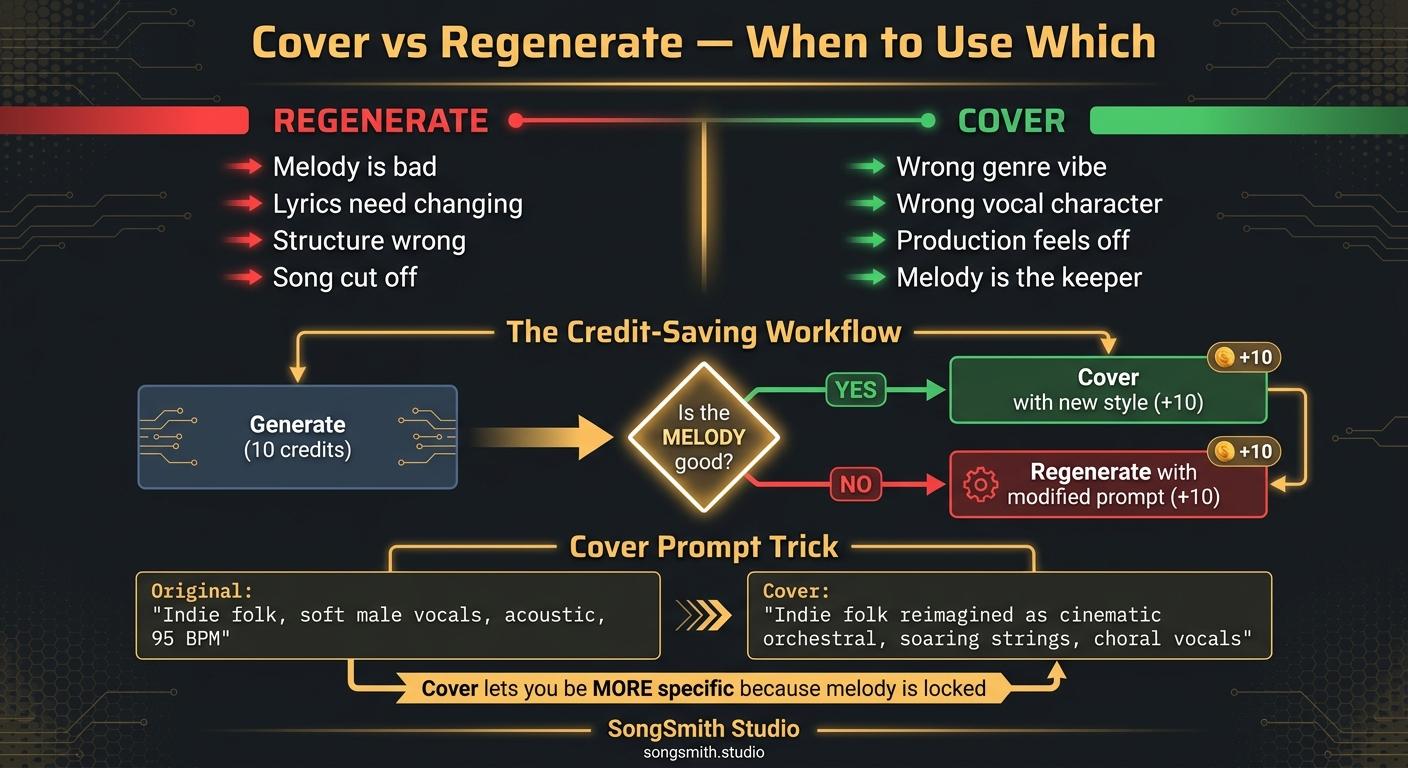
Stop Regenerating: When to Use Suno's Cover Feature Instead (Saves Credits)
Cover is Suno's most underrated button. When to Cover vs regenerate, plus a credit-saving workflow that lands a song in 20-30 credits, not 100+.
2 min read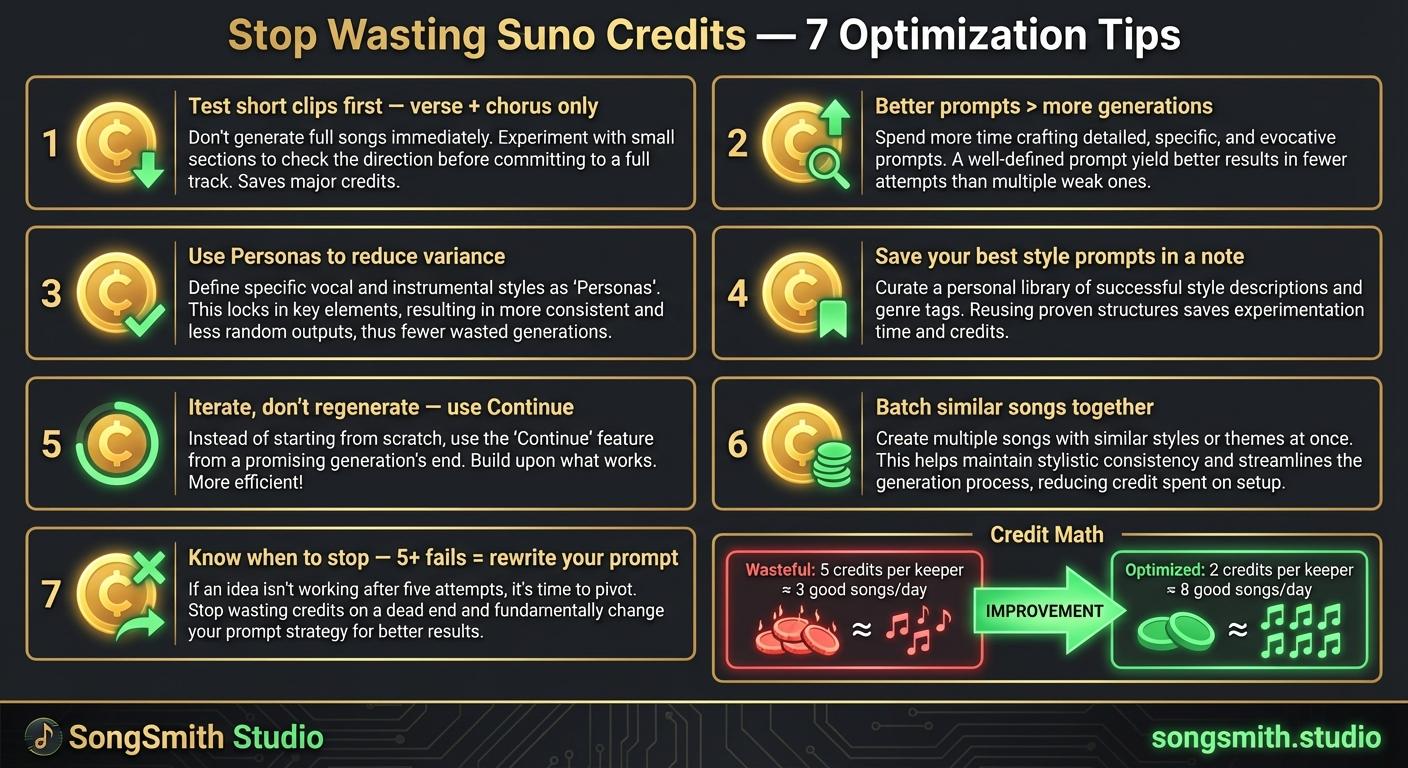
Maximize Your Suno Credits: 7 Proven Ways to Get More Music Per Dollar
7 practical tips to stop wasting Suno credits. Optimize prompts, use personas, iterate instead of regenerate, and double your output per credit.
4 min read![Vertical layout showing 4 numbered methods with icons: Repeat icon for Continue feature, Document icon for Longer lyrics, Flag icon for [Outro] tag, Speedometer icon for BPM control. Each shows a brief explanation and benefit. Bottom includes a pro tip about fixing style drift during extensions.](/_next/image?url=%2Fblog%2F04-how-to-make-full-length-songs-on-suno.jpeg&w=3840&q=75)
How Long Can a Suno Song Be? The 8-Minute Limit and How to Go Past It
Suno generates up to 8 minutes per song. Why yours still come out short, 4 ways to get full-length tracks, and how Extend takes a song past the limit.
4 min read